
Screenshots
About My Photo Keyboard
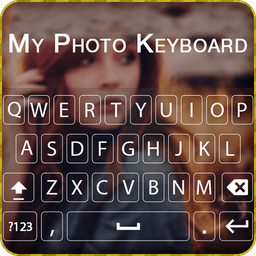
Transform your keyboard into a personal expression with My Photo Keyboard, the custom keyboard app that lets you set your own photos as your typing background. Instead of staring at a standard keyboard layout, personalize every keystroke with images from your gallery or camera—making typing visually unique across all your apps and conversations.
Customize your typing experience to match your style. Choose from over 50 built-in themes, adjust your keyboard height, modify key press feedback with sound and vibration settings, and pick from 50+ font styles to match your aesthetic. Whether you prefer landscape or portrait mode, set separate backgrounds for each orientation and enjoy a keyboard that truly feels like yours.
Type faster and smarter with intelligent features designed for real-world communication. Benefit from emoji prediction on words, next word prediction for quicker texting, and auto spell check to catch mistakes before you send. With 500+ emojis plus GIF stickers and emoji art options, you can express yourself with visuals that enhance your chats with friends. The swipe-to-type functionality lets you glide across the keyboard for rapid input without breaking rhythm.
Reach a global audience with confidence. My Photo Keyboard supports 50+ languages, making it accessible whether you're messaging in English, Spanish, Mandarin, or beyond. Direct search from the keyboard keeps you in the flow, and the template facility enables fast sharing of formatted text across social apps—plus create custom templates for content you use repeatedly.
Enjoy advanced typing control without compromising privacy. Access word editing features including select, cut, copy, paste, home, end, and tab functions. Speak-to-type capability converts your voice into text hands-free. Tablet users benefit from optimized layout design, while all users get customizable keyboard colors and settings to fine-tune every detail.
Download multiple themes for free and experiment without limits. My Photo Keyboard applies universally across your device to every app, messaging platform, and text field—so your personalized keyboard is always at your fingertips. We respect your privacy and never collect personal information, giving you peace of mind while you enjoy this new concept of typing. Make your keyboard beautiful, functional, and uniquely yours with My Photo Keyboard.
Pros & Cons
Pros
- Personalize keyboard with your own photos across all apps
- Intelligent typing features like emoji prediction and next-word suggestions
- Supports 50+ languages for global communication
- Swipe-to-type and voice-to-text for faster input methods
Cons
- Keyboard overlays may reduce visible key size and typing accuracy
- Photo backgrounds could distract from text content while typing
- Requires camera and gallery permissions to access personal images
- Heavy customization options may overwhelm users seeking simplicity
Related Apps

AlienGUIse
Desktop themes and manager for Windows — transform your system with 5 futuristic designs.

SharpKeys
Remap keyboard keys to launch apps, media controls, and custom commands on Windows.

RocketDock
Desktop launcher for Windows — quick access dock with customizable icons and positioning.

Custom Resolution Utility (CRU)
Display resolution utility: Create custom resolutions for your monitor with precise refresh rate control.

Lagguy Wallpapers
Lagguy
4K & HD wallpapers for Android — minimal, abstract, nature, AMOLED designs with lifetime access

Lock Screen OS
Apps Genz
Customize your lock screen with widgets, photos, and notifications. Replace Android's default lock screen.
Latest Articles

Play a free Color Ball Sort Puzzle-style game in your browser (no download)
Oct 6, 2026

Play a free Beach Buggy Racing-style kart racer in your browser (no download)
Oct 6, 2026

Play a free Alto's Adventure-style game in your browser (no download)
Oct 6, 2026

Free online whiteboard like Jamboard: use Quickboard in your browser, no signup
Oct 6, 2026

Free online running pace calculator: splits, race predictor and daily challenge, no download
Oct 6, 2026